How to Make a Sphere in Minecraft
A Minecraft sphere is a stack of circles, one per layer. Build the right circle on each layer, from the bottom up, and the ball takes care of itself. This guide uses a hollow 21-block sphere as the example.
Plan yours with the free Minecraft sphere generator: enter a diameter and it shows every layer, the blocks it needs and where the layer below sits. The steps below show how to build from it.
What you need
- Blocks. A hollow 21 sphere takes 1,082 blocks, which is 16 stacks and 58. Bring a few extra.
- Scaffolding or a cheap block such as dirt, to stand on and to remove later.
- Your coordinates on screen: press F3 in Java Edition, or turn on Show Coordinates in the world settings in Bedrock Edition.
- The plan open on your phone or printed, one layer per step.
Pick the size: odd or even
The diameter is the width of the sphere in blocks, and it is also the number of layers: a 21-block sphere has 21 layers.
Choose an odd number if anything has to sit in the exact middle, such as a beacon, a spawner or a door. An odd sphere has one center block and one widest middle layer. An even sphere has its center between four blocks and two identical middle layers (layers 10 and 11 of a 20 sphere). A hollow 20 sphere takes 968 blocks; a hollow 21 takes 1,082.
Plan it with the generator
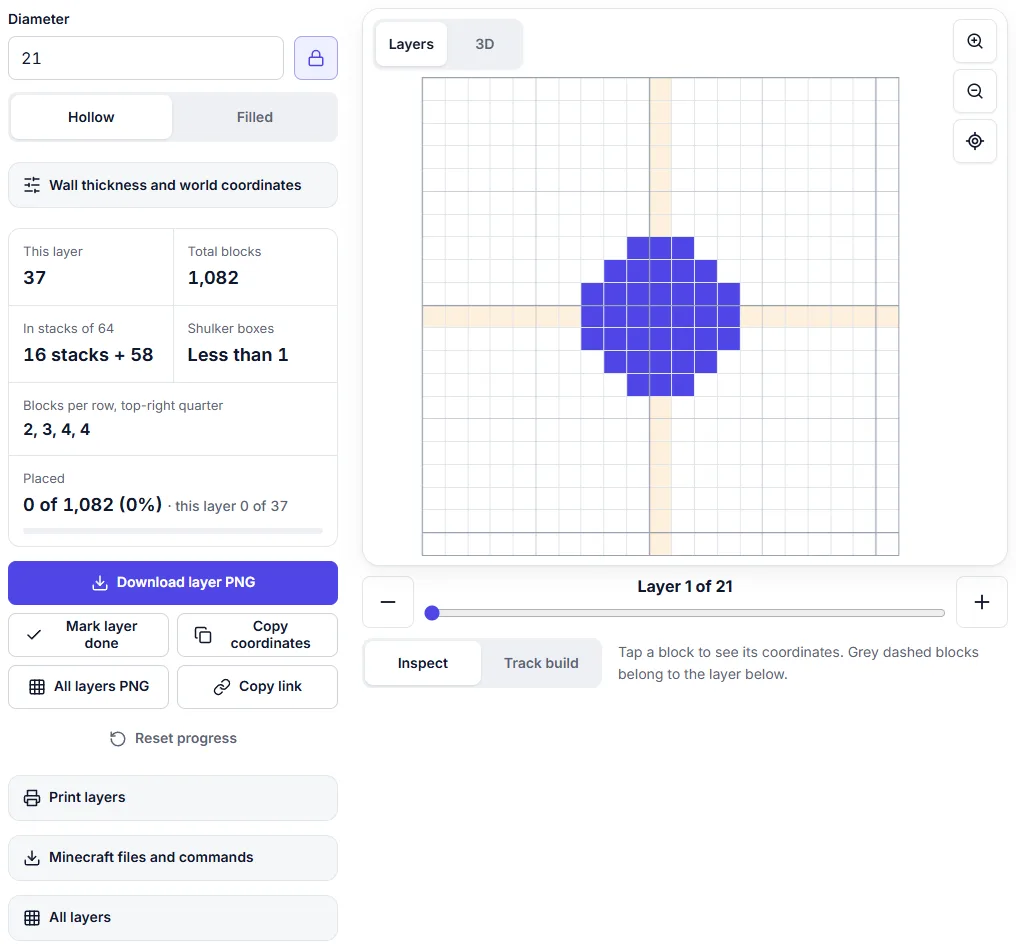
Open the sphere generator, type the diameter and leave it on Hollow. Layer 1 is the bottom. For each layer you see:
- the blocks of that layer as a circle, with bold grid lines every 5 and 10 blocks so you can count;
- grey dashed blocks where the layer below reaches further out;
- the blocks per row for one quarter, so you can count from the edge instead of block by block;
- the block count for the layer and for the whole sphere, in stacks and shulker boxes.
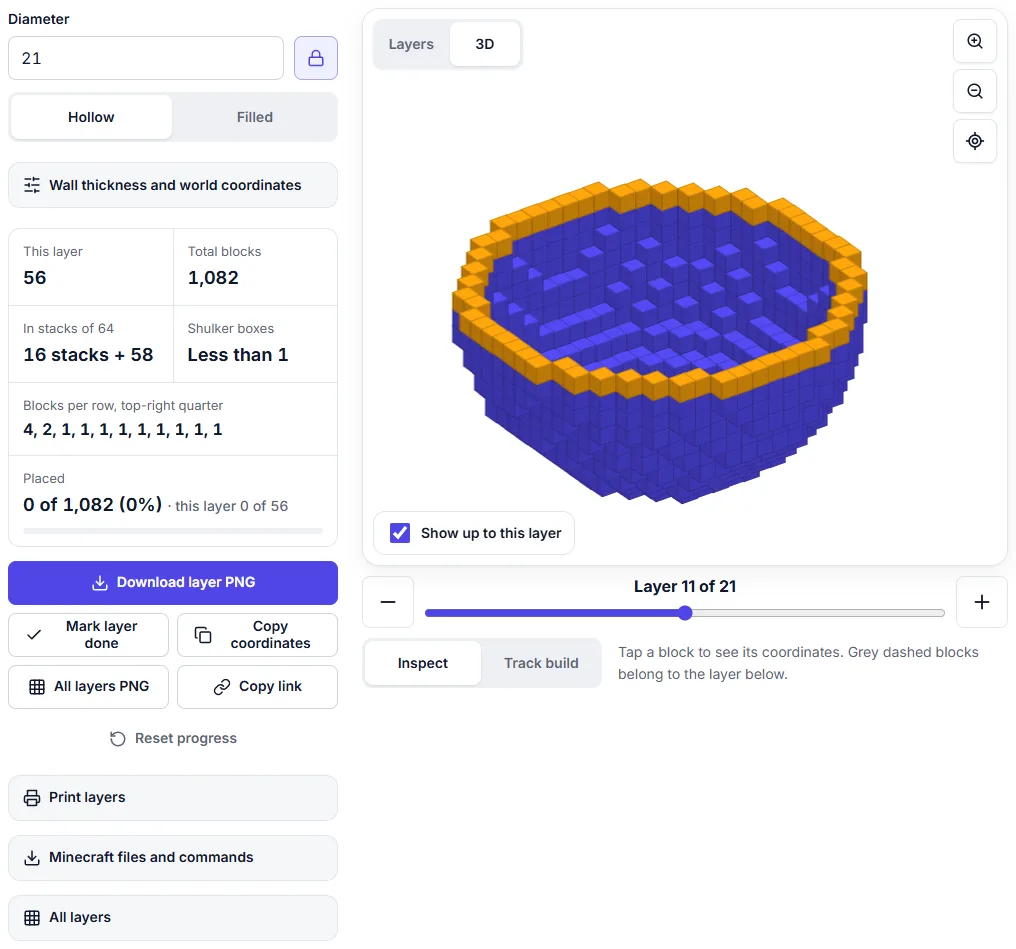
Enter the sphere's center in world coordinates under the settings button, and tapping a block shows its exact X, Y and Z. Switch to 3D to check the whole shape.
Build it layer by layer
Start at the bottom
Mark the bottom center block in your world and write down its coordinates. Layer 1 is not a ring but a solid disc (37 blocks for 21), so place it all, then check it against the plan before going up.
Use the layer below as your guide
Every new layer is drawn over the one below it, shown as grey dashed blocks. In the lower half each ring is wider than the one under it, so you place blocks against the outer side of the layer below. In the upper half each ring is narrower and sits on top of the one below. Line up the four straight sides first (the blocks on the center row and column), then fill in the curve between them.
The shape spreads out fast near the bottom: layer 2 is the widest ring, with 60 blocks, more than the middle layer's 56. Near the bottom the wall is almost flat, so one layer covers a wide band of it.
Count blocks per row
For each layer the generator lists how many blocks each row of one quarter needs. Build one quarter, then mirror it to the other three. The middle layer of a hollow sphere is exactly the thin circle of the same size from the circle generator, 56 blocks for 21, so if you have built circles before, it will look familiar.
Scaffolding and the tracker
Stand inside the sphere on a scaffolding tower while you build the lower half, and outside on scaffolding for the upper half, where the top closes over you. Leave a gap for yourself until the last two layers.
Switch the generator to Track build and tap blocks as you place them, or use Mark layer done. Progress is saved in your browser for each sphere, so you can stop and come back another day. In 3D, Show up to this layer shows how far you have come.
Hollow or filled, and airtight
A hollow sphere is a sealed shell. Each block touches its neighbors by a full face, never only at a corner, so water stays in and mobs stay out. Use it for underwater bases, glass domes, aquariums and planets you can walk into. A thicker wall costs more: 1,082 blocks with a 1-block wall, 2,024 with a 2-block wall.
A filled sphere is solid. It suits tree canopies and decorative planets, but it costs 4,945 blocks for 21, more than four times the hollow one.
Faster: WorldEdit, files and commands
Open Minecraft files and commands under the generator and type a block id such as minecraft:stone.
- .schem (Java with WorldEdit). Put the file in the WorldEdit schematics folder, stand where the bottom center should go, type
//schem loadwith the file name including .schem, then//paste -a. - WorldEdit command. For odd sizes the panel shows a command such as
//hsphere -r minecraft:stone 10that builds the same sphere with its bottom on your block. - .mcstructure (Bedrock). Put the file in a behavior pack's structures folder and load it with
/structure load. Its corner goes at the position you give. - /fill commands and .mcfunction (Java). Copy the commands or download a function file for a datapack; the bottom center goes on the block where they run.
Each of these was tested block by block on real servers: Paper 1.21.11 with WorldEdit 7.4.2 for Java and Bedrock Dedicated Server 1.26.63.1. The Bedrock structure block Import screen was not part of the test.
Common mistakes
- Leaving a hole in the bottom. Layer 1 is a solid disc, and so is the top layer.
- Stopping the bulge too early. The lower layers grow fast. Check each ring against the dashed layer below rather than guessing.
- Mixing up odd and even. If one side is a block longer than the other, you counted one side as even.
- Losing count on big spheres. Print the layers or use the tracker.
How to make a dome in Minecraft
A dome is the top part of a sphere, and you build it the same way: layer by layer from the bottom ring up. The Minecraft dome generator plans it in a few ways:
- Half sphere. The Round shape at its natural height: 11 layers and 569 blocks hollow on a 21-block base, the same as the top half of the 21 sphere.
- Any height. Set a lower height for a flatter roof (7 layers on a 21 base take 445 blocks) or a taller one for a tower top.
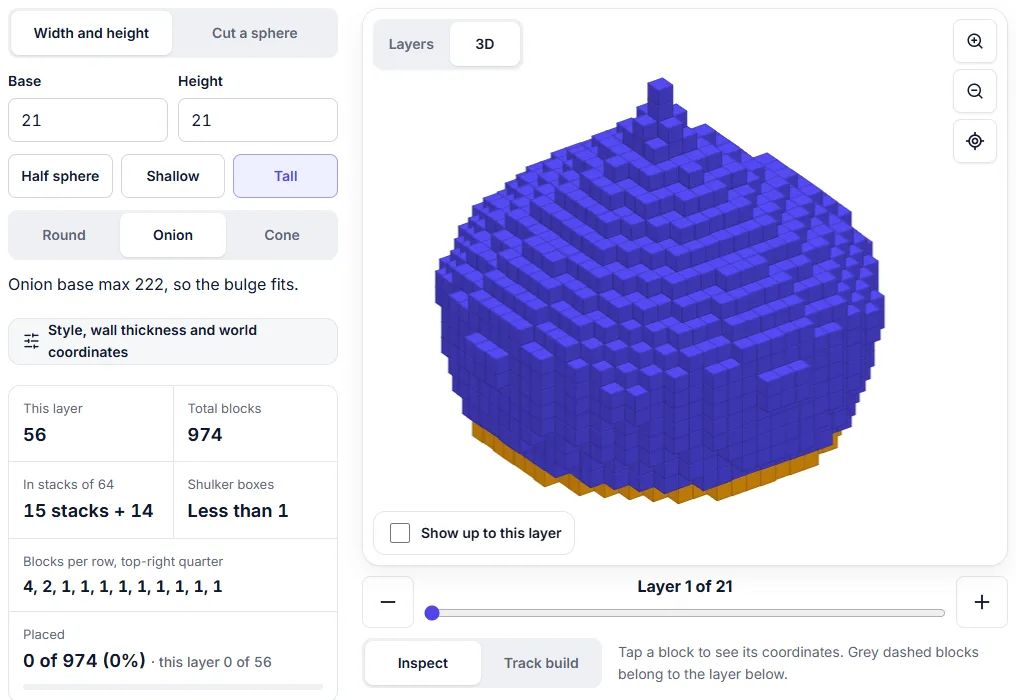
- Onion and cone. Onion bulges out past its base and ends in a point (21 layers, 974 blocks on a 21 base). Cone rises in straight steps (15 layers, 421 blocks).
- Cut a sphere. Keep any number of a sphere's top layers. Keeping 14 of 21 curves back in at the bottom, like a planetarium, for 737 blocks.
A dome on a round tower: the bottom layer of a Round or Onion dome is exactly the thin circle of the same size from the circle generator (56 blocks for 21). Build the tower wall with that circle, then start the dome on top with the same diameter and it lines up block for block.
New to round builds? Start with how to build a circle in Minecraft: every sphere layer uses the same method.
Frequently asked questions
How many blocks do I need for a sphere in Minecraft?
A hollow sphere 21 blocks across with a 1-block wall takes 1,082 blocks (16 stacks and 58). A filled one takes 4,945 (2 shulker boxes, 23 stacks and 17). The sphere generator shows the total for any size, plus the count for every layer.
What is a good size for a first sphere?
Start with 9 to 21 blocks. A hollow 9 sphere is only 186 blocks, and 21 is big enough to look properly round. Past about 50 blocks the build takes hours: a hollow 51 sphere is 6,642 blocks (103 stacks and 50).
Can water leak out of a hollow sphere?
No. Every block of a hollow sphere from the generator touches the next one by a full face, never only at a corner, so water stays inside and mobs cannot get through. That makes it safe for underwater bases and aquariums.
Is building a sphere the same in Java and Bedrock?
Yes. The layer plan is the same in both editions. Only the files differ: .schem with WorldEdit on Java, .mcstructure on Bedrock.
How do I make a half sphere?
Use the dome generator with the Round shape, or cut a sphere in half. On a 21-block base the half sphere is 11 layers high and takes 569 blocks hollow, the same as the top half of the 21 sphere.
Last updated: November 13, 2026